Sunday, 19 February 2017

Object and face detection in OpenCv java

       
package com.test.motion.detection;

import java.awt.image.BufferedImage;
import java.io.File;
import java.io.IOException;
import java.util.ArrayList;
import java.util.List;

import javax.imageio.ImageIO;

import org.opencv.core.Core;
import org.opencv.core.Mat;
import org.opencv.core.MatOfPoint;
import org.opencv.core.MatOfRect;
import org.opencv.core.Point;
import org.opencv.core.Rect;
import org.opencv.core.Scalar;
import org.opencv.core.Size;
import org.opencv.highgui.Highgui;
import org.opencv.highgui.VideoCapture;
import org.opencv.imgproc.Imgproc;
import org.opencv.objdetect.CascadeClassifier;

public class MyTest {
 static OpenCVWindow openCVWindow,openCVWindow1;
    static Mat image;
 public static void main(String[] args) {
  
  System.loadLibrary(Core.NATIVE_LIBRARY_NAME);
  openCVWindow=new OpenCVWindow(1000,600);
  openCVWindow1=new OpenCVWindow(600,600);
       readImgFromCam();  
 }
 public static void readImgFromCam() {
  try {
   image=Highgui.imread("C:/Users/kiit1/Desktop/noface.jpg");
  } catch (Exception e) {
   // TODO Auto-generated catch block
   e.printStackTrace();
  }
  CascadeClassifier faceDetector = new CascadeClassifier("D:/javaTech/OpenCV/opencv/sources/data/lbpcascades/lbpcascade_frontalface.xml");
  
  VideoCapture cam=new VideoCapture(0);//"D:\\karana\\aVid.MP4"
  while(true){
 
   if(!cam.isOpened()){
    cam.open(0);
    System.out.println("No cam Found....");
   }else {
    }
   Mat frameMat=new Mat();
   Mat newmMat=new Mat();
   Mat cropImg=new Mat();
   MatOfRect matOfRect=new MatOfRect();
   //
   Mat blurredImage = new Mat();
   Mat hsvImage = new Mat();
   Mat mask = new Mat();
   Mat morphOutput = new Mat();
   Mat frame;
   cam.read(frameMat);
   Imgproc.resize(frameMat, newmMat, new Size(1000,600));
      
   frame=newmMat;
   Imgproc.blur(frame, blurredImage, new Size(7, 7));
   
   Imgproc.cvtColor(blurredImage, hsvImage, Imgproc.COLOR_BGR2HSV);
   
   Scalar minValues = new Scalar(0, 0,0);
   Scalar maxValues = new Scalar(180, 180,180);
   
   
   Core.inRange(hsvImage,minValues, maxValues, mask);
   // morphological operators
   // dilate with large element, erode with small ones
   Mat dilateElement = Imgproc.getStructuringElement(Imgproc.MORPH_RECT, new Size(24, 24));
   Mat erodeElement = Imgproc.getStructuringElement(Imgproc.MORPH_RECT, new Size(12, 12));
   
   Imgproc.erode(mask, morphOutput, erodeElement);
   Imgproc.erode(mask, morphOutput, erodeElement);//openCVWindow.showImage(morphOutput);
   
   Imgproc.dilate(mask, morphOutput, dilateElement);
   Imgproc.dilate(mask, morphOutput, dilateElement);
   
   frame = findAndDrawBalls(morphOutput, frame);
   
   faceDetector.detectMultiScale(newmMat, matOfRect);
   //for face detect
   for(Rect rect:matOfRect.toArray()){
   // Core.rectangle(new Point(rect.x, rect.y), new Point(rect.x + rect.width, rect.y + rect.height), new Scalar(0, 255, 0));
                    cropImg=newmMat.submat(rect);
          Core.rectangle(newmMat, new Point(rect.x, rect.y), new Point(rect.x + rect.width, rect.y + rect.height), new Scalar(0, 255, 0));
   }
   try{
   openCVWindow1.showImage(cropImg); 
   }catch(Exception e){
    openCVWindow1.showImage(image);
   }
   //openCVWindow.showImage(frame);
   openCVWindow.showImage(newmMat);

   
  }
  //cam.release();


 }
 private static Mat findAndDrawBalls(Mat maskedImage, Mat frame)
 {
  // init
  List<MatOfPoint> contours = new ArrayList<>();
  Mat hierarchy = new Mat();
  
  // find contours
  Imgproc.findContours(maskedImage, contours, hierarchy, Imgproc.RETR_CCOMP, Imgproc.CHAIN_APPROX_SIMPLE);
  
  // if any contour exist...
  if (hierarchy.size().height > 0 && hierarchy.size().width > 0)
  {
   // for each contour, display it in blue
   for (int idx = 0; idx >= 0; idx = (int) hierarchy.get(0, idx)[0])
   {
    Imgproc.drawContours(frame, contours, idx, new Scalar(250, 0, 0));
   }
  }
  
  return frame;
 }
 

}


import java.awt.Dimension;
import java.io.ByteArrayInputStream;
import java.io.InputStream;

import javax.imageio.ImageIO;
import javax.swing.JFrame;

import org.opencv.core.Mat;
import org.opencv.core.MatOfByte;
import org.opencv.highgui.Highgui;

public class OpenCVWindow extends JFrame{
 
 private static final long serialVersionUID = 1L;
 Sheet sheet;
 int height, width;


 public OpenCVWindow( int length, int breadth)
 {
  width = length;
  height = breadth;
  sheet = new Sheet(breadth,length);
  
  this.setSize(new Dimension(length, breadth));
  this.add(sheet);

  this.setFocusable(true);
  this.setDefaultCloseOperation(JFrame.EXIT_ON_CLOSE);
  this.setVisible(true);
  
 }


 public void showImage(Mat m)
 {
  MatOfByte matOfByte = new MatOfByte();
  Highgui.imencode(".jpg", m, matOfByte);
  
  byte[] byteArray = matOfByte.toArray();
  try
  {

   InputStream in = new ByteArrayInputStream(byteArray);
   sheet.paintSheet(ImageIO.read(in));
   
  } catch (Exception e)
  {
   e.printStackTrace();
  }
 }
}

import java.awt.Graphics;
import java.awt.image.BufferedImage;

import javax.swing.JPanel;

public class Sheet extends JPanel
{
 private static final long serialVersionUID = 1L;
 BufferedImage image;
 int width, height;

 public Sheet( int h, int w)
 {
  width = w;
  height = h;

  setSize(w, h);
 }

 public void paintSheet(BufferedImage img)
 {
  image = img;
  repaint();
 }

 public void paintComponent(Graphics g)
 {
  g.drawImage(image, 0, 0, width, height, this);
 }
}

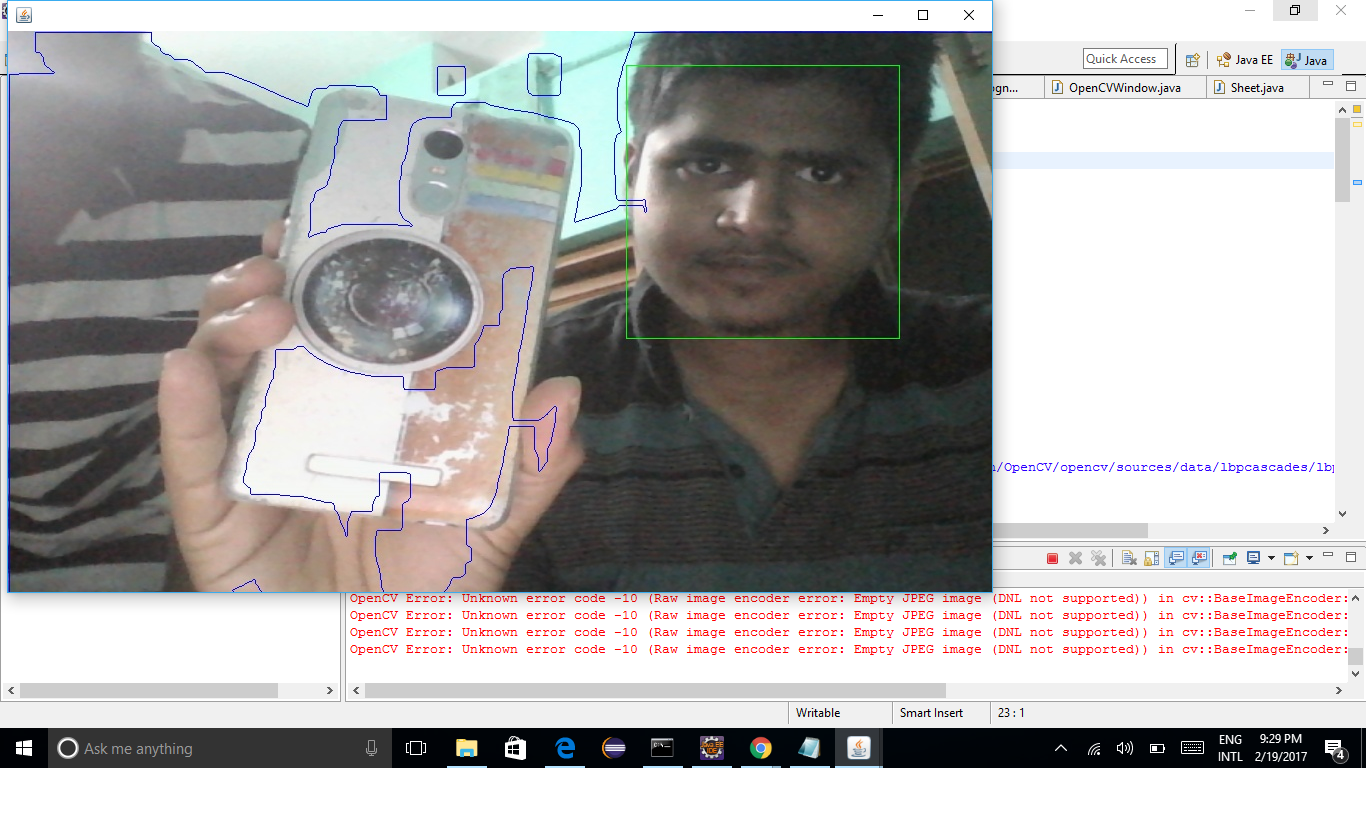
                                          OUTPUT
Friday, 10 February 2017

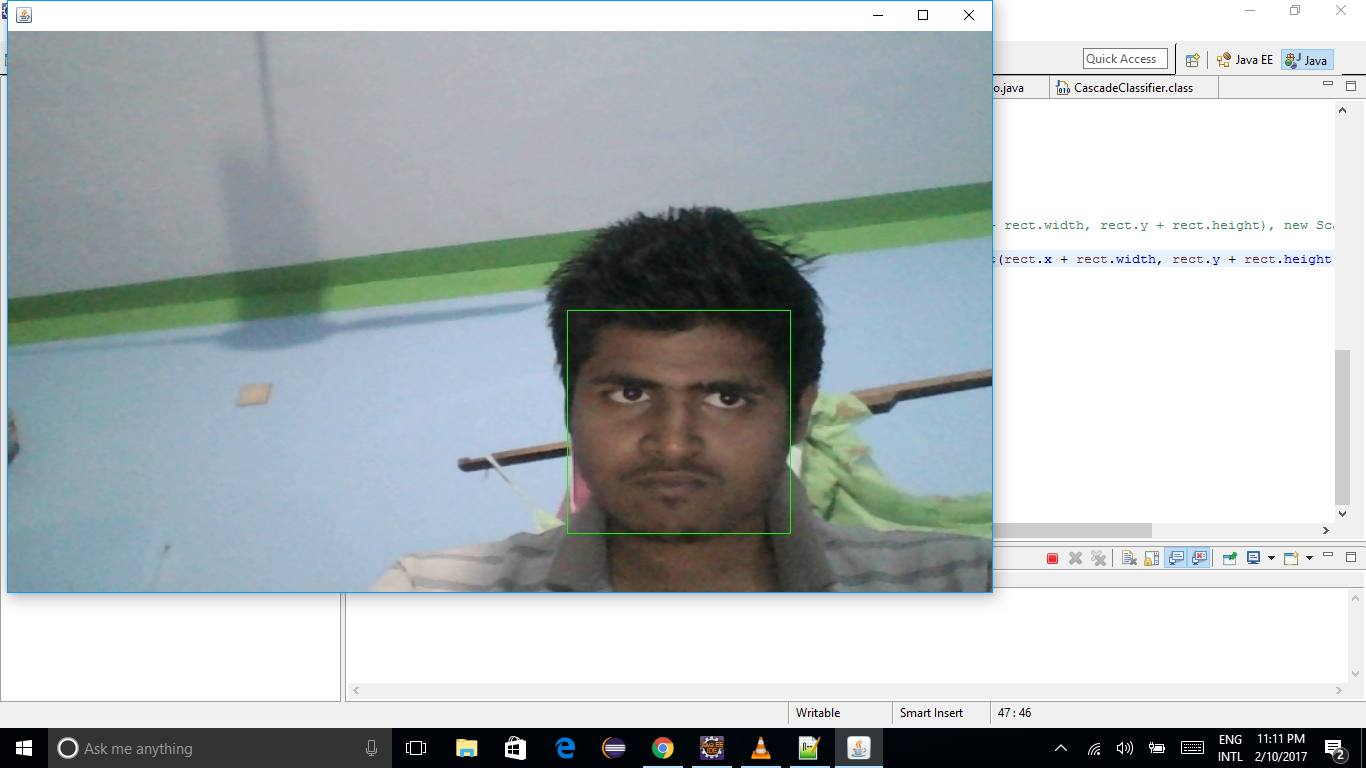
Face detection by video processing in Java Using Open CV !

Please setup Your IDE For OpenCV


package com.test.motion.detection;

import org.opencv.core.Core;
import org.opencv.core.Mat;
import org.opencv.core.MatOfRect;
import org.opencv.core.Point;
import org.opencv.core.Rect;
import org.opencv.core.Scalar;
import org.opencv.core.Size;
import org.opencv.highgui.VideoCapture;
import org.opencv.imgproc.Imgproc;
import org.opencv.objdetect.CascadeClassifier;

public class MyTest {
 static OpenCVWindow openCVWindow;
  
 public static void main(String[] args) {
  System.loadLibrary(Core.NATIVE_LIBRARY_NAME);
  openCVWindow=new OpenCVWindow(1000,600);

       readImgFromCam();  
 }
 public static void readImgFromCam() {
  CascadeClassifier faceDetector = new CascadeClassifier("D:/javaTech/OpenCV/opencv/sources/data/lbpcascades/lbpcascade_frontalface.xml");
  
  VideoCapture cam=new VideoCapture(0);
  while(true){
   
   if(!cam.isOpened()){
    cam.open(0);
    System.out.println("No cam Found....");
   }else {
    }
   Mat frameMat=new Mat();
   Mat newmMat=new Mat();
   MatOfRect matOfRect=new MatOfRect();
      
   
   cam.read(frameMat);
   Imgproc.resize(frameMat, newmMat, new Size(1000,600));
   
   faceDetector.detectMultiScale(newmMat, matOfRect);
   
   for(Rect rect:matOfRect.toArray()){
   // Core.rectangle(new Point(rect.x, rect.y), new Point(rect.x + rect.width, rect.y + rect.height), new Scalar(0, 255, 0));

          Core.rectangle(newmMat, new Point(rect.x, rect.y), new Point(rect.x + rect.width, rect.y + rect.height), new Scalar(0, 255, 0));
   }
   
   openCVWindow.showImage(newmMat);


  }
  //cam.release();


 }

}


 package com.test.motion.detection;

import java.awt.Dimension;
import java.io.ByteArrayInputStream;
import java.io.InputStream;

import javax.imageio.ImageIO;
import javax.swing.JFrame;

import org.opencv.core.Mat;
import org.opencv.core.MatOfByte;
import org.opencv.highgui.Highgui;

public class OpenCVWindow extends JFrame{
 
 private static final long serialVersionUID = 1L;
 Sheet sheet;
 int height, width;


 public OpenCVWindow( int length, int breadth)
 {
  width = length;
  height = breadth;
  sheet = new Sheet(breadth,length);
  
  this.setSize(new Dimension(length, breadth));
  this.add(sheet);

  this.setFocusable(true);
  this.setDefaultCloseOperation(JFrame.EXIT_ON_CLOSE);
  this.setVisible(true);
  
 }


 public void showImage(Mat m)
 {
  MatOfByte matOfByte = new MatOfByte();
  Highgui.imencode(".jpg", m, matOfByte);
  
  byte[] byteArray = matOfByte.toArray();
  try
  {

   InputStream in = new ByteArrayInputStream(byteArray);
   sheet.paintSheet(ImageIO.read(in));
   
  } catch (Exception e)
  {
   e.printStackTrace();
  }
 }
}

package com.test.motion.detection;

import java.awt.Graphics;
import java.awt.image.BufferedImage;

import javax.swing.JPanel;

public class Sheet extends JPanel
{
 private static final long serialVersionUID = 1L;
 BufferedImage image;
 int width, height;

 public Sheet( int h, int w)
 {
  width = w;
  height = h;

  setSize(w, h);
 }

 public void paintSheet(BufferedImage img)
 {
  image = img;
  repaint();
 }

 public void paintComponent(Graphics g)
 {
  g.drawImage(image, 0, 0, width, height, this);
 }
}


OUTPUT


Wednesday, 8 February 2017

How to watch a folder in Java ?

       
import static java.nio.file.LinkOption.NOFOLLOW_LINKS;
import static java.nio.file.StandardWatchEventKinds.ENTRY_CREATE;
import static java.nio.file.StandardWatchEventKinds.OVERFLOW;
import static java.nio.file.StandardWatchEventKinds.ENTRY_DELETE;
import static java.nio.file.StandardWatchEventKinds.ENTRY_MODIFY;

import java.io.File;
import java.io.IOException;
import java.nio.file.FileSystem;
import java.nio.file.Files;
import java.nio.file.Path;
import java.nio.file.WatchEvent;
import java.nio.file.WatchEvent.Kind;
import java.nio.file.WatchKey;
import java.nio.file.WatchService;

public class MainWatch {

    public static void watchDirectoryPath(Path path) {
        // Sanity check - Check if path is a folder
        try {
            Boolean isFolder = (Boolean) Files.getAttribute(path,
                    "basic:isDirectory", NOFOLLOW_LINKS);
            if (!isFolder) {
                throw new IllegalArgumentException("Path: " + path
                        + " is not a folder");
            }
        } catch (IOException ioe) {
            // Folder does not exists
            ioe.printStackTrace();
        }

        System.out.println("Watching path: " + path);

        // We obtain the file system of the Path
        FileSystem fs = path.getFileSystem();

        // We create the new WatchService using the new try() block
        try (WatchService service = fs.newWatchService()) {

            // We register the path to the service
            // We watch for creation events
            path.register(service, ENTRY_CREATE,ENTRY_MODIFY,ENTRY_DELETE);
            
            // Start the infinite polling loop
            WatchKey key = null;
            while (true) {
                key = service.take();

                // Dequeueing events
                Kind<?> kind = null;
                for (WatchEvent<?> watchEvent : key.pollEvents()) {
                    // Get the type of the event
                    kind = watchEvent.kind();
                    if (OVERFLOW == kind) {
                        continue; // loop
                    } else if (ENTRY_CREATE == kind) {
                        // A new Path was created
                        Path newPath = ((WatchEvent<Path>) watchEvent)
                                .context();
                        // Output
                        System.out.println("New path created: " + newPath);
                    } else if (ENTRY_MODIFY == kind) {
                        // modified
                        Path newPath = ((WatchEvent<Path>) watchEvent)
                                .context();
                        // Output
                        System.out.println("New path modified: " + newPath);
                    }
                }

                if (!key.reset()) {
                    break; // loop
                }
            }

        } catch (IOException ioe) {
            ioe.printStackTrace();
        } catch (InterruptedException ie) {
            ie.printStackTrace();
        }

    }

    public static void main(String[] args) throws IOException,
            InterruptedException {
        
        File dir = new File("D:\\");
        watchDirectoryPath(dir.toPath());
    }
    }


Friday, 27 January 2017

2nd Step password Cheeking In java

Here i hard code my password As "sibu".Run the code And enjoy.


       /*
 * To change this license header, choose License Headers in Project Properties.
 * To change this template file, choose Tools | Templates
 * and open the template in the editor.
 */
package privatemgr;

/**
 *
 * @author kiit1
 */
public class myfreame extends javax.swing.JFrame {

    /**
     * Creates new form myfreame
     */
    public myfreame() {
        initComponents();
    }

    /**
     * This method is called from within the constructor to initialize the form.
     * WARNING: Do NOT modify this code. The content of this method is always
     * regenerated by the Form Editor.
     */
    @SuppressWarnings("unchecked")
    // <editor-fold defaultstate="collapsed" desc="Generated Code">                          
    private void initComponents() {

        jInternalFrame1 = new javax.swing.JInternalFrame();
        jTextField1 = new javax.swing.JTextField();
        jButton1 = new javax.swing.JButton();

        setDefaultCloseOperation(javax.swing.WindowConstants.EXIT_ON_CLOSE);
        addFocusListener(new java.awt.event.FocusAdapter() {
            public void focusLost(java.awt.event.FocusEvent evt) {
                formFocusLost(evt);
            }
        });
        addWindowFocusListener(new java.awt.event.WindowFocusListener() {
            public void windowGainedFocus(java.awt.event.WindowEvent evt) {
            }
            public void windowLostFocus(java.awt.event.WindowEvent evt) {
                formWindowLostFocus(evt);
            }
        });
        addWindowListener(new java.awt.event.WindowAdapter() {
            public void windowClosed(java.awt.event.WindowEvent evt) {
                formWindowClosed(evt);
            }
            public void windowClosing(java.awt.event.WindowEvent evt) {
                formWindowClosing(evt);
            }
            public void windowDeactivated(java.awt.event.WindowEvent evt) {
                formWindowDeactivated(evt);
            }
        });

        jInternalFrame1.setVisible(true);

        jTextField1.setText("Ans Here");
        jTextField1.addFocusListener(new java.awt.event.FocusAdapter() {
            public void focusGained(java.awt.event.FocusEvent evt) {
                jTextField1FocusGained(evt);
            }
        });

        jButton1.setText("Ok");
        jButton1.addActionListener(new java.awt.event.ActionListener() {
            public void actionPerformed(java.awt.event.ActionEvent evt) {
                jButton1ActionPerformed(evt);
            }
        });

        javax.swing.GroupLayout jInternalFrame1Layout = new javax.swing.GroupLayout(jInternalFrame1.getContentPane());
        jInternalFrame1.getContentPane().setLayout(jInternalFrame1Layout);
        jInternalFrame1Layout.setHorizontalGroup(
            jInternalFrame1Layout.createParallelGroup(javax.swing.GroupLayout.Alignment.LEADING)
            .addGroup(jInternalFrame1Layout.createSequentialGroup()
                .addGroup(jInternalFrame1Layout.createParallelGroup(javax.swing.GroupLayout.Alignment.LEADING)
                    .addGroup(jInternalFrame1Layout.createSequentialGroup()
                        .addGap(69, 69, 69)
                        .addComponent(jTextField1, javax.swing.GroupLayout.PREFERRED_SIZE, 155, javax.swing.GroupLayout.PREFERRED_SIZE))
                    .addGroup(jInternalFrame1Layout.createSequentialGroup()
                        .addGap(100, 100, 100)
                        .addComponent(jButton1, javax.swing.GroupLayout.PREFERRED_SIZE, 74, javax.swing.GroupLayout.PREFERRED_SIZE)))
                .addContainerGap(59, Short.MAX_VALUE))
        );
        jInternalFrame1Layout.setVerticalGroup(
            jInternalFrame1Layout.createParallelGroup(javax.swing.GroupLayout.Alignment.LEADING)
            .addGroup(jInternalFrame1Layout.createSequentialGroup()
                .addContainerGap()
                .addComponent(jTextField1, javax.swing.GroupLayout.PREFERRED_SIZE, javax.swing.GroupLayout.DEFAULT_SIZE, javax.swing.GroupLayout.PREFERRED_SIZE)
                .addGap(18, 18, 18)
                .addComponent(jButton1)
                .addContainerGap(104, Short.MAX_VALUE))
        );

        javax.swing.GroupLayout layout = new javax.swing.GroupLayout(getContentPane());
        getContentPane().setLayout(layout);
        layout.setHorizontalGroup(
            layout.createParallelGroup(javax.swing.GroupLayout.Alignment.LEADING)
            .addGroup(layout.createSequentialGroup()
                .addGap(39, 39, 39)
                .addComponent(jInternalFrame1, javax.swing.GroupLayout.PREFERRED_SIZE, javax.swing.GroupLayout.DEFAULT_SIZE, javax.swing.GroupLayout.PREFERRED_SIZE)
                .addContainerGap(62, Short.MAX_VALUE))
        );
        layout.setVerticalGroup(
            layout.createParallelGroup(javax.swing.GroupLayout.Alignment.LEADING)
            .addGroup(layout.createSequentialGroup()
                .addGap(32, 32, 32)
                .addComponent(jInternalFrame1, javax.swing.GroupLayout.PREFERRED_SIZE, javax.swing.GroupLayout.DEFAULT_SIZE, javax.swing.GroupLayout.PREFERRED_SIZE)
                .addContainerGap(62, Short.MAX_VALUE))
        );

        pack();
    }// </editor-fold>                        

    private void jButton1ActionPerformed(java.awt.event.ActionEvent evt) {                                         
        // TODO add your handling code here:  
        String msg=(String)jTextField1.getText();
        System.out.println("privatemgr.myfreame.jButton1ActionPerformed()"+msg);
        if (msg.equals("sibu")){
            System.exit(0);
        }
        else{
            try {
                Process process = Runtime.getRuntime().exec("rundll32.exe user32.dll, LockWorkStation");
            } catch (Exception e) {
            }
        }
    }                                        

    private void jTextField1FocusGained(java.awt.event.FocusEvent evt) {                                        
        // TODO add your handling code here:
    }                                       

    private void formFocusLost(java.awt.event.FocusEvent evt) {                               
        // TODO add your handling code here:
        try {
                Process process = Runtime.getRuntime().exec("rundll32.exe user32.dll, LockWorkStation");
            } catch (Exception e) {
                e.printStackTrace();
            }
    }                              

    private void formWindowLostFocus(java.awt.event.WindowEvent evt) {                                     
        // TODO add your handling code here:
        try {
                Process process = Runtime.getRuntime().exec("rundll32.exe user32.dll, LockWorkStation");
            } catch (Exception e) {
            }
    }                                    

    private void formWindowClosed(java.awt.event.WindowEvent evt) {                                  
        // TODO add your handling code here:
                 new myfreame().setVisible(true);
                 try {
                Process process = Runtime.getRuntime().exec("rundll32.exe user32.dll, LockWorkStation");
            } catch (Exception e) {
            }
    }                                 

    private void formWindowDeactivated(java.awt.event.WindowEvent evt) {                                       
        // TODO add your handling code here:
                 new myfreame().setVisible(true);
                 try {
                Process process = Runtime.getRuntime().exec("rundll32.exe user32.dll, LockWorkStation");
            } catch (Exception e) {
            }
    }                                      

    private void formWindowClosing(java.awt.event.WindowEvent evt) {                                   
        // TODO add your handling code here:
        try {
                Process process = Runtime.getRuntime().exec("rundll32.exe user32.dll, LockWorkStation");
            } catch (Exception e) {
            }
    }                                  

    /**
     * @param args the command line arguments
     */
    public static void main(String args[]) {
        /* Set the Nimbus look and feel */
        //<editor-fold defaultstate="collapsed" desc=" Look and feel setting code (optional) ">
        /* If Nimbus (introduced in Java SE 6) is not available, stay with the default look and feel.
         * For details see http://download.oracle.com/javase/tutorial/uiswing/lookandfeel/plaf.html 
         */
        try {
            for (javax.swing.UIManager.LookAndFeelInfo info : javax.swing.UIManager.getInstalledLookAndFeels()) {
                if ("Nimbus".equals(info.getName())) {
                    javax.swing.UIManager.setLookAndFeel(info.getClassName());
                    break;
                }
            }
        } catch (ClassNotFoundException ex) {
            java.util.logging.Logger.getLogger(myfreame.class.getName()).log(java.util.logging.Level.SEVERE, null, ex);
        } catch (InstantiationException ex) {
            java.util.logging.Logger.getLogger(myfreame.class.getName()).log(java.util.logging.Level.SEVERE, null, ex);
        } catch (IllegalAccessException ex) {
            java.util.logging.Logger.getLogger(myfreame.class.getName()).log(java.util.logging.Level.SEVERE, null, ex);
        } catch (javax.swing.UnsupportedLookAndFeelException ex) {
            java.util.logging.Logger.getLogger(myfreame.class.getName()).log(java.util.logging.Level.SEVERE, null, ex);
        }
        //</editor-fold>

        /* Create and display the form */
        java.awt.EventQueue.invokeLater(new Runnable() {
            public void run() {
                new myfreame().setVisible(true);
            }
        });
    }

    // Variables declaration - do not modify                     
    private javax.swing.JButton jButton1;
    private javax.swing.JInternalFrame jInternalFrame1;
    private javax.swing.JTextField jTextField1;
    // End of variables declaration                   
}


Thursday, 22 December 2016

How to start MongoDB In Windows?

Open CMD as Administer  and Type flowing command....


>Mongod.exe --install --logpath c:\data\logs.log --logappend --bind_ip 127.0.0.1 --dbpath c:\data\db --directoryperdb

after execution type..

>net Start Mongodb

>Mongo.exe


Friday, 2 December 2016

Simple video streaming Example In HTML5

Here we not Use any RTMP protocol in Server side. 
This video Is simply present in server  Side.And Browser is download file as stream and feed to Our video element.  

       <video src="http://youlearners.com/streaming/Avengers2.mp4"
               controls preload="auto" width="640" height="264"
               data-setup='{"controls":true}'>
            <source type='video/mp4' />
     </video>

 <!---here i Use data-setup='{"controls":true}' and preload="auto" for load and play simultaneously---->

OPTPUT

Friday, 25 November 2016

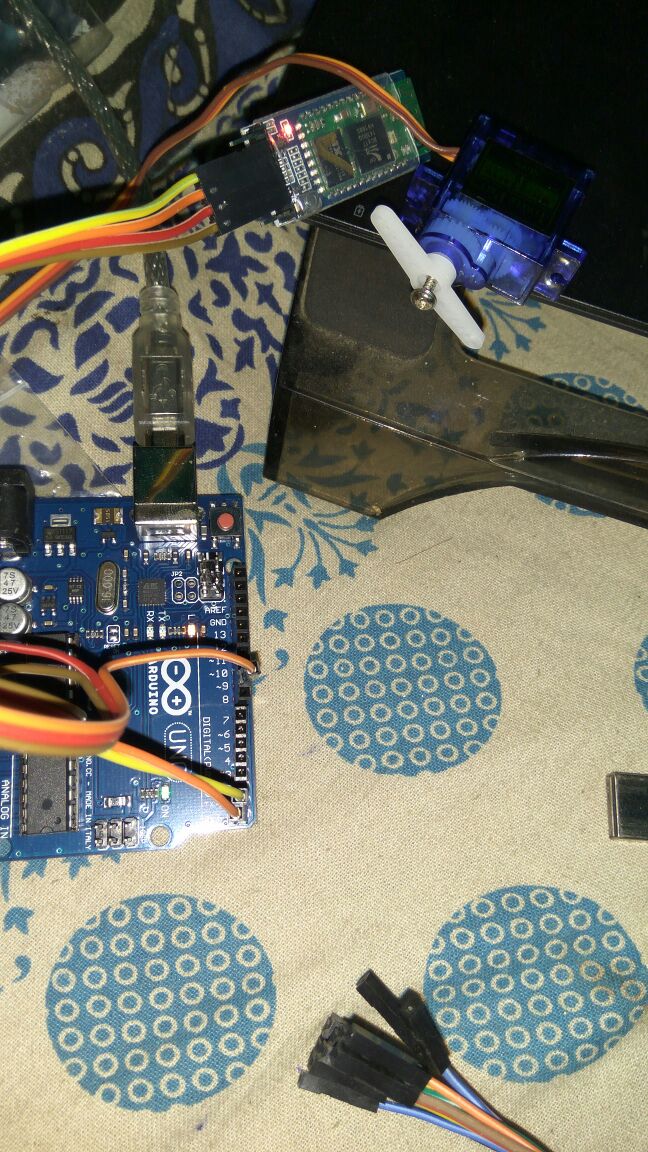
How to control arduino connected Servo motor from an android app Over Bluetooth connection ?

You can get your connection and device assembling from another stuffs.Here I place My code which i developed. which may useful for You. 

For Any Query comment below ..

//Arduino code..


#include <Servo.h>
int pos=0;
int servoPin=9;
int servoDelay=25;
Servo myPointer;

char data = 0;                //Variable for storing received data
void setup() 
{
  Serial.begin(9600);         //Sets the data rate in bits per second (baud) for serial data transmission
  //pinMode(13, OUTPUT);        //Sets digital pin 13 as output pin
  myPointer.attach(servoPin);
}
void loop()
{
  if(Serial.available() > 0)  // Send data only when you receive data:
  {
    while(Serial.available()==0){}
    pos=Serial.parseInt();
    myPointer.write(pos);
  }
}


//code FOR android application

AndroidManifest.xml file
<?xml version="1.0" encoding="utf-8"?><manifest xmlns:android="http://schemas.android.com/apk/res/android"    package="com.example.kiit1.audrinoblutooth">
    <uses-sdk        android:minSdkVersion="8"        android:targetSdkVersion="17" />
    <uses-permission android:name="android.permission.BLUETOOTH"/>
    <uses-permission android:name="android.permission.BLUETOOTH_ADMIN"/>

    <application        android:allowBackup="true"        android:icon="@mipmap/ic_launcher"        android:label="@string/app_name"        android:supportsRtl="true"        android:theme="@style/AppTheme">
        <activity android:name=".MainActivity">
            <intent-filter>
                <action android:name="android.intent.action.MAIN" />

                <category android:name="android.intent.category.LAUNCHER" />
            </intent-filter>
        </activity>
    </application>

</manifest>

activity_main.xml File
<?xml version="1.0" encoding="utf-8"?><RelativeLayout xmlns:android="http://schemas.android.com/apk/res/android"    xmlns:tools="http://schemas.android.com/tools"    android:id="@+id/activity_main"    android:layout_width="match_parent"    android:layout_height="match_parent"    android:paddingBottom="@dimen/activity_vertical_margin"    android:paddingLeft="@dimen/activity_horizontal_margin"    android:paddingRight="@dimen/activity_horizontal_margin"    android:paddingTop="@dimen/activity_vertical_margin"    tools:context="com.example.kiit1.audrinoblutooth.MainActivity">

    <EditText android:layout_width="wrap_content"
              android:layout_height="wrap_content"
              android:inputType="number"
              android:ems="10"  
              android:layout_alignParentTop="true"  
              android:layout_centerHorizontal="true" 
              android:layout_marginTop="184dp"  
              android:id="@+id/editText" />

    <Button   android:text="Move"
              android:layout_width="wrap_content"
              android:layout_height="wrap_content"  
              android:layout_alignParentBottom="true"
              android:layout_alignStart="@+id/button"
              android:layout_marginBottom="82dp"
              android:id="@+id/button2" />

    <Button   android:text="Button" 
              android:layout_width="wrap_content" 
              android:layout_height="wrap_content"
              android:layout_marginTop="45dp" 
              android:id="@+id/button"
              android:layout_alignParentTop="true" 
              android:layout_centerHorizontal="true" />
</RelativeLayout>
for mainActivity 
package com.example.kiit1.audrinoblutooth;

import android.app.AlertDialog;
import android.bluetooth.BluetoothAdapter;
import android.bluetooth.BluetoothDevice;
import android.bluetooth.BluetoothSocket;
import android.os.ParcelUuid;
import android.support.v7.app.AppCompatActivity;
import android.os.Bundle;
import android.util.Log;
import android.view.View;
import android.widget.Button;
import android.widget.EditText;
import android.widget.Toast;

import java.io.IOException;
import java.io.InputStream;
import java.io.OutputStream;
import java.util.Set;

public class MainActivity extends AppCompatActivity {
    private OutputStream outputStream;
    private InputStream inStream;

    @Override    protected void onCreate(Bundle savedInstanceState) {
        int position=0;
        try {
            BluetoothAdapter blueAdapter = BluetoothAdapter.getDefaultAdapter();
            if (blueAdapter != null) {

                if (blueAdapter.isEnabled()) {
                    Set<BluetoothDevice> bondedDevices = blueAdapter.getBondedDevices();

                    if (bondedDevices.size() > 0) {
                        Object[] devices = (Object[]) bondedDevices.toArray();
                        Toast.makeText(getBaseContext(), devices.length+"", Toast.LENGTH_LONG).show();
                        BluetoothDevice device = (BluetoothDevice) devices[position];
                        ParcelUuid[] uuids = device.getUuids();
                        BluetoothSocket socket = device.createRfcommSocketToServiceRecord(uuids[0].getUuid());
                        socket.connect();
                        outputStream = socket.getOutputStream();
                        inStream = socket.getInputStream();
                    }

                    Log.e("error", "No appropriate paired devices.");
                } else {
                    Log.e("error", "Bluetooth is disabled.");
                }
            }
        }catch(Exception e){
            e.printStackTrace();
            Toast.makeText(getBaseContext(), "SETUP Failure", Toast.LENGTH_LONG).show();
            AlertDialog.Builder builder = new AlertDialog.Builder(this);
            //Creating dialog box            AlertDialog alert = builder.create();
            //Setting the title manually            alert.setTitle("Error");
            String sErr=e.toString();
            alert.setMessage(sErr);
            alert.show();

        }


        super.onCreate(savedInstanceState);
        setContentView(R.layout.activity_main);
        Button button2=(Button)findViewById(R.id.button2);
        final EditText editText=(EditText)findViewById(R.id.editText);
        button2.setOnClickListener(new View.OnClickListener() {
            @Override            public void onClick(View v) {
             String str= editText.getText().toString();
                try {
                    write(str);
                }catch(Exception e){
                    Toast.makeText(getBaseContext(), "Connection Failure", Toast.LENGTH_LONG).show();
                }
            }
        });
    }

    public void write(String s) throws IOException {
        outputStream.write(s.getBytes());
    }
}


OUT PUT


It rotate degree you Send form your app..